


Color Flow - Color by Number
4.6795.00 Reviews
App Specs
- Version
- 1.9.55
- Updated On
- License
- Free
- Downloads
- 500,000+
- Developer
- Coloring Game Studio@RabiGame
- Categories
- Board
- Platform
- Android, iOS
Screenshots

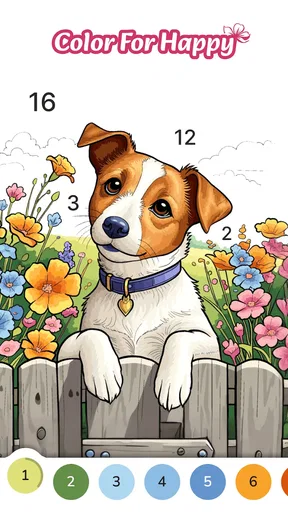
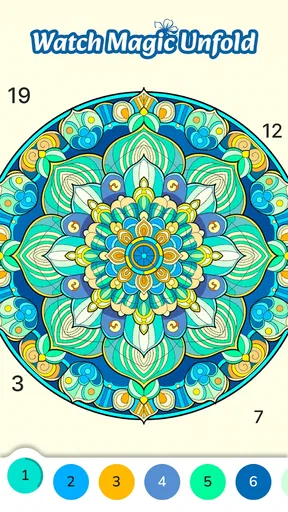
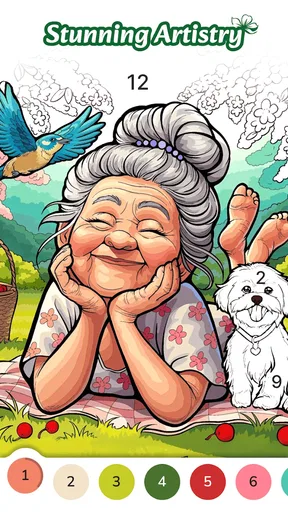
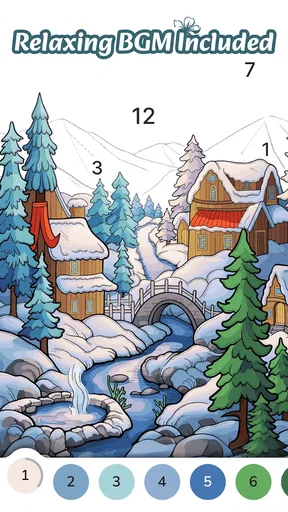
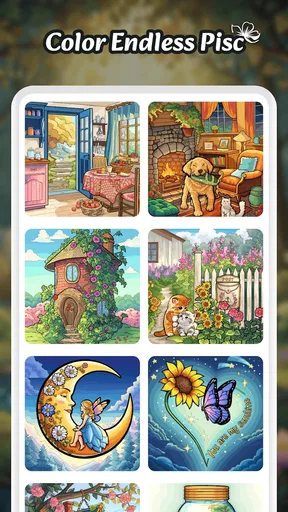
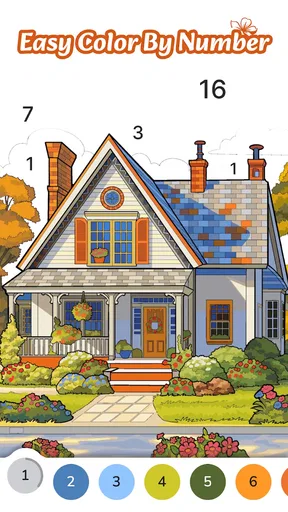

 Analysis by AppCompare
I opened Color Flow - Color by Number expecting a simple coloring break, and that is mostly what I found: a board-style game built around filling numbered areas with matching colors. Its appeal is not speed, competition, or complicated rules. It is the small satisfaction of watching an unfinished picture become complete while your attention settles on one task at a time.
That makes it an interesting choice for quiet moments. I can imagine using it after work, while waiting for an appointment, or when I want something more focused than scrolling but less demanding than a traditional puzzle game. The developer is Coloring Game Studio@RabiGame, and the game is free to install for everyone, with optional in-app purchases listed from $4.99 to $99.99 per item. That purchase range is worth keeping in mind before downloading, especially if you prefer completely predictable free play.
How the coloring flow feels in everyday use
The basic idea is easy to understand. A picture is divided into numbered sections, and I select a color before tapping the matching spaces. The interaction is familiar enough that I did not need a tutorial-heavy introduction. The pleasure comes from gradually removing the visual noise: a crowded outline becomes recognizable, then polished, then finished.
This is a better fit for short, repeatable sessions than for a long uninterrupted gaming night. I found the activity most comfortable when treated as a reset between tasks. For example, after answering messages and before starting dinner, I could spend a few minutes completing a cluster of small areas. There is a clear stopping point whenever a picture or section feels complete, so the game does not demand the same commitment as a story game or a competitive board title.
The “flow” idea works best when I resist rushing. If I tap quickly just to finish, the experience becomes a hunt for tiny numbered spaces. If I slow down and work through one color at a time, it becomes calmer. My practical tip is to zoom or inspect the image before starting a difficult-looking area, then choose a color that appears in several visible sections. That creates a simple rhythm and reduces the feeling of searching randomly.
It is also useful to think of the game as a digital coloring activity rather than a conventional board game. There is no need to learn a strategy, memorize a map, or manage a deck. The board category describes the structured, tap-based format, but the emotional experience is closer to a relaxing coloring book. Anyone looking for tactical decisions or meaningful competition may find the label slightly misleading.
A gentle routine rather than a demanding challenge
What I like most is the low barrier to entry. The age rating is Everyone, and the central action is understandable without specialist gaming knowledge. A child can recognize the color-by-number pattern, while an adult can use it as a quiet distraction. That broad accessibility is a strength, although it also means experienced puzzle players may find the early experience too easy.
Worth Reading Before You Choose

EA SPORTS FC Mobile 26 Is a Bigger Football Game, but It Takes Time

Flipboard Shows What News Apps Must Do Beyond the Feed

Switching to Android Auto Means Rethinking Your Driving Routine

Google Calendar Makes a Crowded Week Easier to Manage

Ludo King Makes the Most of the Minutes Between Plans

Baby Panda World Brings Quick Play to Modern Phones, but Its Game Library Feels Busy
The game can work particularly well for people who enjoy visible progress. Each completed patch gives immediate feedback, and the picture itself acts as a progress indicator. Instead of watching a percentage rise, I can see the image becoming clearer. That visual change is a small but effective reward, especially when I do not have the concentration for a complicated challenge.
One useful habit is to stop before the activity turns into irritation. Tiny uncolored sections can be easy to overlook, and repeatedly hunting for the final spot can change a relaxing session into a chore. I prefer completing a satisfying portion and returning later rather than treating every image as something that must be finished in one sitting. That approach also makes the game feel less like a checklist.
What the free model means in practice
The game is free to download, which makes trying it low-risk from the initial installation point. However, the presence of in-app purchases means “free” should not automatically be read as “everything is available without spending.” The listed purchase range begins at $4.99 and extends to $99.99 per item. Those are materially different levels of spending, so I would advise checking every purchase prompt carefully rather than tapping through quickly.
I would also decide in advance whether I am willing to spend anything. That simple boundary matters more in a relaxing game because the mood encourages casual tapping. A purchase can feel insignificant when I am focused on completing a picture, but the upper end of the listed range is substantial. I would keep payment authentication enabled on the device and avoid treating a locked or promoted item as a reason to buy immediately.
From a fairness perspective, the confirmed purchase information tells me the game has paid options, but it does not establish that spending is required to enjoy the coloring activity. I would therefore approach it as a free experience with optional monetization, not as a guaranteed fully unlocked catalog. If your personal rule is that a coloring game must contain no paid elements at all, this may not be the right match.
Progress, patience, and the pressure to keep going
Color-by-number games naturally create a loop: choose a shade, fill matching sections, notice the image taking shape, and continue toward completion. That loop is satisfying because the next action is always obvious. It can also create mild pressure to finish once only a few spaces remain. I noticed that the last details can demand more attention than the first broad areas, even though the task itself has not become more complex.
My advice is to use the game according to your energy level. When I want a quick mental break, I choose a small goal, such as completing one color family or one visible part of the illustration. When I have more patience, I continue toward the finished image. This keeps progress under my control instead of letting the unfinished board dictate how long I play.
There is another trade-off: the more carefully I search for every matching number, the more the activity resembles visual scanning than coloring. That can be relaxing for some people and tiring for others. If you experience eye strain from small details, short sessions and a larger screen may be more comfortable than trying to complete everything on a phone in one stretch.
The game is not the best choice for someone who needs a strong sense of mastery. The satisfaction comes from completion and visual transformation, not from discovering a clever solution. A logic puzzle, strategy board game, or traditional nonogram would offer more decision-making. I would choose this one when I want guided concentration, not when I want to test my reasoning against a difficult problem.
Does spending change the competitive balance?
There is an important distinction here: this is not the kind of board game where I need to beat another player, climb a ranking, or prove that my decisions are better than someone else’s. Because the core activity is personal coloring, competitive fairness is less central than it would be in a card battler or online strategy game.
That does not make monetization irrelevant. Paid access can still affect how much content or convenience a player receives, and that can change the feeling of progression. But without a competitive match to influence, I judge fairness mainly by whether the free path remains enjoyable and whether purchase prompts are clear enough to understand. I would not spend simply to keep up with other players, because the experience is fundamentally individual.
This is one reason I see the game as more suitable for relaxation than achievement chasing. A person who wants leaderboards, head-to-head rounds, or meaningful strategic advantage should look elsewhere. Someone who wants to complete images at their own pace will probably care more about the available artwork, the smoothness of selecting areas, and how often the game interrupts the calm rhythm with commercial prompts.
Compared with a physical coloring book, the app is more convenient and less messy. I do not need pencils, a table, or storage space, and I can pick it up whenever I have a spare moment. The trade-off is that a physical book gives me direct control over every color and mark, while color-by-number software guides the result. Compared with a standard digital coloring app, this game is more structured but less expressive. It gives me a target to complete instead of an empty canvas.
Compared with classic board games on mobile, it is far less social and strategic. A digital chess, checkers, or tile game asks me to plan around another player or a defined system of turns. Here, the board is mainly a picture waiting to be filled. That is a strength when I want solitude, but a weakness when I want conversation, rivalry, or replay value based on changing decisions.
What I would check before committing to it
The game was released on September 22, 2023, and the current version is 1.9.54. It requires Android 6.0 or later, so compatibility is reasonably broad for Android users with older devices. I would still check the device requirement before installing, particularly if I am using an older phone or tablet. A larger display could make detailed coloring more comfortable, but the minimum operating-system requirement is the practical starting point.
The public response is encouraging: it holds a 4.6 average from around 4.6 thousand ratings, with over 500 thousand installs and 794 written reviews. Those figures suggest that many people find the concept appealing, but they do not tell me whether every player likes the same parts of it. Ratings are especially limited for judging monetization, because a relaxing core loop and a satisfying purchase experience are separate questions.
I would pay attention to my own reaction during the first session. Do I enjoy the act of locating numbered areas, or do I find it tedious? Do purchase prompts make me uncomfortable? Do I want more freedom than the fixed color choices provide? These questions are more useful than assuming a high rating guarantees a personal match. The game’s strongest quality is its focused simplicity, and that same simplicity will feel repetitive to players who need variety in mechanics.
Another practical point is expectations around the word “stressless.” I would not treat the app as a medical or therapeutic tool. It may help occupy attention and create a quiet routine, but the effect will vary from person to person. If you are dealing with serious anxiety, sleep problems, or persistent stress, a coloring game should remain a leisure activity rather than a replacement for appropriate support.
Who should try it, and who should skip it?
I would recommend it to people who enjoy guided creative tasks, visual completion, and short solo sessions. It is especially suitable if you like coloring but do not want to choose every shade yourself. It can also suit families looking for an accessible activity with an Everyone rating, provided an adult handles purchase settings and explains that free installation does not mean every option is necessarily free.
I would be more cautious if you dislike repetitive tapping, have little patience for finding small numbered areas, or want a game with a strong story. Players who prefer direct competition should choose a multiplayer board title instead. Players who want unrestricted artistic control should choose a blank-canvas coloring app. Players with strict no-purchase preferences should inspect the app’s payment prompts before settling into it.
For my own use, the best workflow is simple: open it during a defined break, select one manageable section, work through colors slowly, and stop at a natural visual milestone. I would not use it as background entertainment while doing another task, because the numbered areas require enough attention to make multitasking awkward. It works better when I give it a few undivided minutes.
My trust verdict after weighing the trade-offs
Color Flow - Color by Number succeeds because it understands the appeal of a small, controlled task. I do not need to learn a complicated ruleset, compete with anyone, or prepare anything before starting. The numbered coloring structure gives me a clear path from unfinished image to completed picture, and that can be genuinely satisfying during a busy day.
My main reservation is not the coloring concept but the spending context. The game is free, yet it includes in-app purchases ranging from $4.99 to $99.99 per item. I would approach it with a firm budget and careful attention to prompts. That does not automatically make the experience unfair, especially because there is no competitive ladder where purchases would give one player an advantage over another, but it does mean the free-to-play label deserves a thoughtful reading.
The strong rating, broad install base, Everyone age classification, and current Android support make it easy to consider as a casual download. Still, popularity cannot decide whether the scanning and tapping loop suits you. I would recommend trying it if you want a quiet, structured coloring break and are comfortable with optional paid content. I would skip it in favor of a strategy board game, social title, or unrestricted coloring app if you need challenge, interaction, or artistic freedom.
Overall, I see it as a pleasant digital coloring companion rather than a deep board game. Used in short sessions and with spending boundaries in place, it offers a calm way to focus on one image at a time. The best reason to install it is not to chase progress, but to enjoy a few minutes of deliberate, low-pressure attention.
Pros
- Relaxing gameplay suitable for short breaks or longer sessions.
- Large variety of coloring pages across multiple themes.
- Simple controls make it accessible for beginners and children.
- Bright finished artwork can be saved and shared easily.
- Offline play is available for many coloring pages.
Cons
- Some advanced pictures or tools may require in-app purchases.
- Frequent ads can interrupt the coloring experience.
- Small sections may be difficult to tap accurately on phones.
- Limited creative freedom compared with freehand coloring apps.
- Progress may depend on watching ads or completing extra tasks.
FAQs for Color Flow - Color by Number
What is Color Flow - Color by Number?
Color Flow - Color by Number is a relaxing digital coloring app built around numbered illustrations. You choose an image, select a color, and fill the matching numbered sections until the artwork is complete. The app is designed for casual entertainment and stress relief, offering a simple experience that does not require drawing skills or previous coloring experience.
How does the coloring system work in Color Flow - Color by Number?
Each picture is divided into small sections marked with numbers, and every number corresponds to a specific color in the palette. After selecting a color, you tap the matching areas to fill them in. This makes the process easy to follow, although very detailed images can require patience. Helpful highlighting or guidance features may make it easier to find remaining sections.
Does Color Flow - Color by Number work offline?
Basic coloring may be available without a constant internet connection once the necessary content has loaded, but some features can depend on online access. New artwork, advertisements, cloud-related functions, or updates may require the internet. If offline use is important to you, it is best to test the app after downloading an image and check whether the specific gallery or feature you want remains accessible.
Is Color Flow - Color by Number free to download and use?
Color Flow - Color by Number can generally be downloaded at no initial cost, allowing users to try its main coloring experience for free. However, free apps of this type may include advertisements, optional purchases, premium artwork, or other paid features. Before confirming a purchase, review the store listing and in-app payment details carefully, especially if children use the device.
Is Color Flow - Color by Number suitable for children and adults?
The straightforward controls and numbered coloring format can make Color Flow - Color by Number suitable for both children and adults. Younger users may enjoy the bright artwork and simple interaction, while adults may use it as a short relaxation activity. Parents should still check the app’s age rating, advertising, privacy information, and purchase settings before allowing unsupervised use.


